Fist of all install this application on your windows server:
1;Elevated PowerShell-session.
2;Windows Server Backup feature installed.
3; Feature common line tools of windows server backup feature must be enable too.
3;At least Windows Management Framework 3.0
After thtat, create a script folder on your server like : c:\scritpt\
move above script for this folder:
After that, custom the script for add email information:
email from,
email to,
smtp
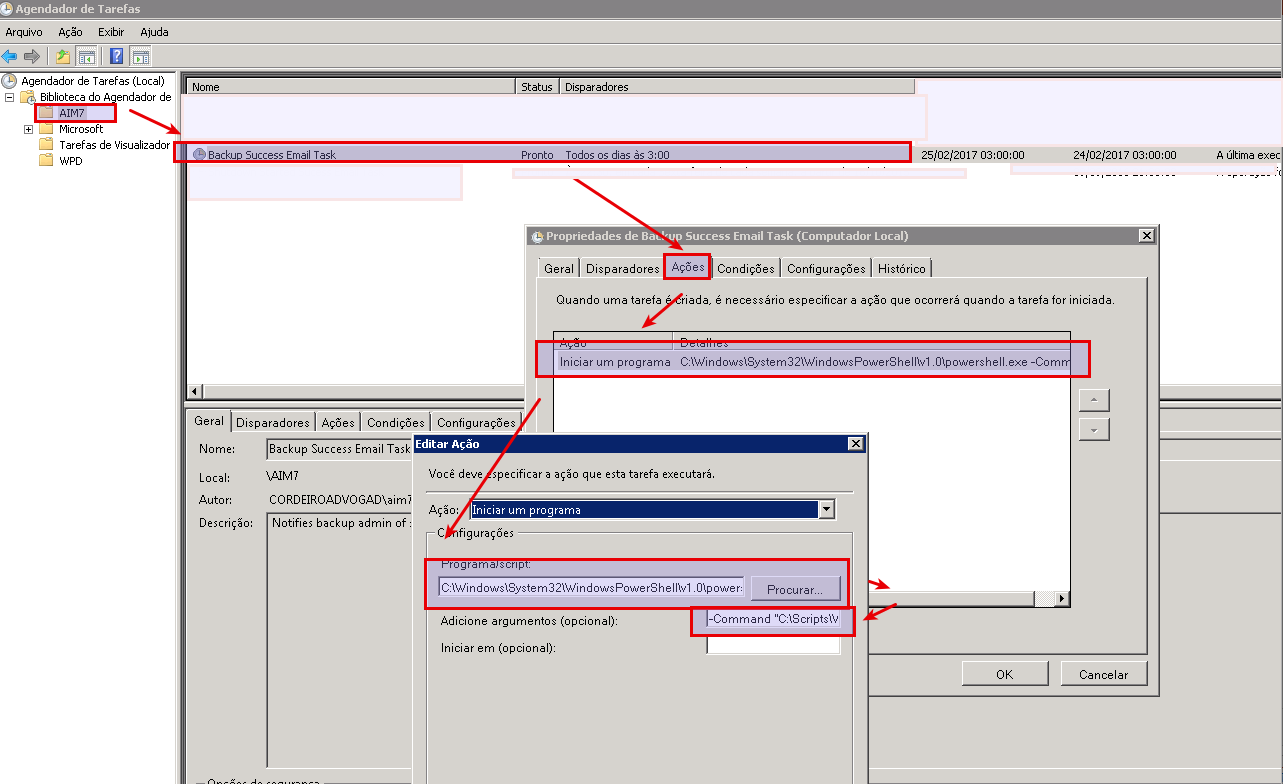
and add on your task manager with this detail.
Script program:
C:\Windows\System32\WindowsPowerShell\v1.0\powershell.exe
Aditional arguments:
-Command "C:\Scripts\WBJobReport.ps1" -ExecutionPolicy Bypass
download above: wbjobreport.ps1:
###############################START SCRIPT####################################
<#
.SYNOPSIS
Windows Backup Mail Report
Written by Joakim, http://jocha.se
.DESCRIPTION
Version 4.1 - Updated 2016-05-31
This script will mail a report from the latest Windows Backup job, can also fetch and generate reports from remote servers. The script requires at least PowerShell v3.
.EXAMPLE
To automate this script, setup a scheduled task.
Name: Backup Email Task
Description: Notifies backup admin of scheduled backup status
Run whether user is logged on or not
Trigger > On event > Log=Microsoft-Windows-Backup/Operational > Source=Backup > Event ID(s)= 4,5,8,9,17,22,49,50,52,100,517,518,521,527,528,544,545,546,561,564,612
Action: Start a Program
Program: Powershell
Arguments: -Command "C:\Scripts\WBJobReport.ps1" -ExecutionPolicy Bypass
#>
#Add-PSSnapin Windows.ServerBackup -ErrorAction Silently
#######################################
#-------- Variables to change --------#
# Uncomment the two rows below and row 207 to enable "Remote Report" generation.
#$Servers = New-PSSession -Computername Server01, Server02, Server03
#Invoke-Command -Session $Servers {
# Set your Company name
$Company = "Cordeiro Advogados - Backup Local"
# Set the recipient/sender email-address
$MailTo = "youremail"
$MailFrom = "$Company "
# SMTP user account password
$MailUser = "youremail"
$MailPassword = "pass"
# SMTP Server
$MailServer = "yoursmtpserver"
# SMTP Port
$MailPort = 25
# If your server uses SSL, otherwise set to $false
$UseSSL = $false
#---- Don't change anything below ----#
#######################################
Try {
$CurrentTime = (Get-Date).ToString("yyyy-MM-dd HH:mm")
$Computer = Get-Content env:computername
$WBJob = Get-WBJob -Previous 1
$WBSummary = Get-WBSummary
$WBLastSuccess = ($WBSummary.LastSuccessfulBackupTime).ToString("yyyy-MM-dd HH:mm")
$WBResult = $WBSummary.LastBackupResultHR
$WBErrorMsg = $WBJob.ErrorDescription + "`n" + $WBSummary.DetailedMessage
$WBStartTime = $WBJob.StartTime
$WBEndTime = $WBJob.EndTime
$WBDuration = (New-TimeSpan -Start $WBStartTime -End $WBEndTime)
$Password = ConvertTo-SecureString $MailPassword -AsPlainText -Force
$Credentials = New-Object System.Management.Automation.PSCredential ($MailUser, $Password)
Function FormatBytes
{
Param
(
[System.Int64]$Bytes
)
[string]$BigBytes = ""
#Convert to TB
If ($Bytes -ge 1TB) {$BigBytes = [math]::round($Bytes / 1TB, 2); $BigBytes += " TB"}
#Convert to GB
ElseIf ($Bytes -ge 1GB) {$BigBytes = [math]::round($Bytes / 1GB, 2); $BigBytes += " GB"}
#Convert to MB
ElseIf ($Bytes -ge 1MB) {$BigBytes = [math]::round($Bytes / 1MB, 2); $BigBytes += " MB"}
#Convert to KB
ElseIf ($Bytes -ge 1KB) {$BigBytes = [math]::round($Bytes / 1KB, 2); $BigBytes += " KB"}
#If smaller than 1KB, leave at bytes.
Else {$BigBytes = $Bytes; $BigBytes += " Bytes"}
Return $BigBytes
}
Function Log-BackupItems
{
Param
(
[System.String]$Name,
[System.String]$Status,
[System.Int64]$Bytes
)
$Item = New-Object System.Object;
$Item | Add-Member -Type NoteProperty -Name "Name" -Value $Name;
$Item | Add-Member -Type NoteProperty -Name "Status" -Value $Status;
$Item | Add-Member -Type NoteProperty -Name "Size" -Value (FormatBytes -Bytes $Bytes);
Return $Item;
}
$results=@()
$WBJob | % {
$_.JobItems | % {
$BackupItem = $null
If ($_.Name -eq 'VolumeList') {
$_ | % {$_.SubItemList | % {
$BackupItem = Log-BackupItems -Name $_.Name -Status $_.State -Bytes $_.TotalBytes
$results += $BackupItem
}}
}
Else {
$_ | % {
$BackupItem = Log-BackupItems -Name $_.Name -Status $_.State -Bytes $_.TotalBytes
$results += $BackupItem
}
}
}
}
# Change Result of 0 to Success in green text and any other result as Failure in red text
If ($WBResult -eq 0) { $WBResult = "Successful"}
Else {$WBResult = "Failed"}
# Assemble the HTML Report
$HTMLMessage = @"
<!DOCTYPE html>
<html>
<head>
<title>$Company Microsoft Backup Local Report for $Computer</title>
<style>
body { font-family: Verdana, Geneva, Arial, Helvetica, sans-serif; font-size: 12px }
h3{ clear: both; font-size: 150%; margin-left: 20px;margin-top: 30px; }
table { padding: 15px 0 20px; width: 500px; text-align: left; }
td, th { padding: 0 20px 0 0; margin 0; text-align: left; }
th { margin-top: 15px }
a, a:visited { color: #2ea3f2; text-decoration: none; }
#Report { width: 600px; }
#Successful { color: green }
#Failed { color: red }
</style>
</head>
<body>
<div id="Report">
<p><h3><a href="http://jocha.se">$Company Backup Report for $Computer</a></p></h3>
<table id="summary"><tbody>
<tr><td>Todays date:</td>
<td>$CurrentTime</td></tr>
<tr><td>Last Successful Backup:</td>
<td>$WBLastSuccess</td></tr>
<tr><td>Start time last backup:</td>
<td>$WBStartTime</td></tr>
<tr><td>End time last backup:</td>
<td>$WBEndTime</td></tr>
<tr><td>Duration last backup:</td>
<td>$WBDuration</td></tr>
<tr><td>Backup Result:</td>
<td><b id="$WBResult">$WBResult</b></td></tr>
<tr><td>Error Message (if applicable):</td>
<td>$WBErrorMsg</td></tr></tbody></table>
$(
$html = $results | ConvertTo-HTML -Fragment
$xml=[xml]$html
$attr=$xml.CreateAttribute('id')
$attr.Value='items'
$xml.table.Attributes.Append($attr) | out-null
$html=$xml.OuterXml | out-string
$html
)
</div>
</body>
</html>
"@
$email = @{
SMTPServer = $MailServer
UseSSL = $UseSSL
BodyAsHtml = $true
Port = $MailPort
Credential = $Credentials
Encoding = ([System.Text.Encoding]::UTF8)
To = $MailTo
From = $MailFrom
Subject = "$WBResult Backup on $Computer"
Body = $HTMLMessage
}
Send-MailMessage @email
}
Catch {
# $email = @{
# SMTPServer = $MailServer
# BodyAsHtml = $true
# UseSSL = $UseSSL
#Port is a PowerShell v3 variable
# Port = $MailPort
# Credential = $Credentials
# Encoding = ([System.Text.Encoding]::UTF8)
# To = $MailTo
# From = $MailFrom
# Subject = "Failed Backup on $Computer"
# Body = "The backup script failed to run!"
#}
#Send-MailMessage @email
#}
# Uncomment below to enable "Remote Report".
}
#####################################END SCRIPT################################
source detail from: http://blog.jocha.se/tech/wbadmin-backup-mail-report
emprovements for your management: https://gallery.technet.microsoft.com/scriptcenter/Windows-Server-Backup-d5ae1172