apt install xsltproc
sudo nmap -sV <YOUR_IP> -oX scan.xml && xsltproc scan.xml -o "`date +%m%d%y`_report.html"
domingo, 12 de maio de 2019

domingo, 14 de abril de 2019
HOW TO INSTALL VEGA SCANNER
On Ubuntu/Debian systems: sudo apt-get install libwebkitgtk-1.0
wget https://support.subgraph.com/downloads/VegaBuild-linux.gtk.x86_64.zip
unzip VegaBuild-linux.gtk.x86_64.zip
cd VegaBuild-linux.gtk.x86_64
./Vega
obs,
During review my post was observerd that in ubuntu 20. is complicate do run this app, the solution finded was install a java 8 version using this command:
sudo apt install openjdk-8-jdk
and for swith the java version for use some application you should set this command first:
sudo update-alternatives --config java
sábado, 6 de abril de 2019
HOW TO INSTALL OSMEDEUS
apt-get update && apt-get upgrade
pip freeze or pip3 freeze
pip install dirhunt
pip install pycurl
apt install python3-pip
pip3 install --upgrade setuptools
pip3 install flask-mysqldb
pip install —upgrade setuptools
pip install gcloud
sudo apt install libcurl4-openssl-dev libssl-dev
pip install pycurl, sudo pip install pycurl, pip3 install pycurl, sudo pip3 install pycurl
git clone https://github.com/j3ssie/Osmedeus
cd Osmedeus
./install.sh
sudo apt-get install python-setuptools
sudo apt-get install python3-setuptools
source: https://github.com/j3ssie/Osmedeus
source for advanced commands: https://github.com/j3ssie/Osmedeus/wiki/Advanced-Usage
tested on 18.04.2 LTS bionic
pip freeze or pip3 freeze
pip install dirhunt
pip install pycurl
apt install python3-pip
pip3 install --upgrade setuptools
pip3 install flask-mysqldb
pip install —upgrade setuptools
pip install gcloud
sudo apt install libcurl4-openssl-dev libssl-dev
pip install pycurl, sudo pip install pycurl, pip3 install pycurl, sudo pip3 install pycurl
git clone https://github.com/j3ssie/Osmedeus
cd Osmedeus
./install.sh
sudo apt-get install python-setuptools
sudo apt-get install python3-setuptools
after install, for execute scan in a specific domain you could do the following command:
./osmedeus.py -t example.comsource: https://github.com/j3ssie/Osmedeus
source for advanced commands: https://github.com/j3ssie/Osmedeus/wiki/Advanced-Usage
tested on 18.04.2 LTS bionic
quarta-feira, 27 de março de 2019
How to Disable WPAD in Windows
To disable WPAD in Windows, you'll need to make an easy registry edit, as StackExchange user laktak points out:
Click the Start button, and in the search field, type in "regedit", then select "regedit.exe" from the list of results.
Navigate through the tree to HKEY_CURRENT_USER\Software\Microsoft\Windows\CurrentVersion\Internet Settings\Wpad.
Once you have the "Wpad" folder selected, right click in the right pane, and click on "New -> DWORD (32-Bit Value)".
Name this new value "WpadOverride".
Double click the new "WpadOverride" value to edit it.
In the "Value data" field, replace the "0" with a "1", then click "OK".
Reboot the computer.
Click the Start button, and in the search field, type in "regedit", then select "regedit.exe" from the list of results.
Navigate through the tree to HKEY_CURRENT_USER\Software\Microsoft\Windows\CurrentVersion\Internet Settings\Wpad.
Once you have the "Wpad" folder selected, right click in the right pane, and click on "New -> DWORD (32-Bit Value)".
Name this new value "WpadOverride".
Double click the new "WpadOverride" value to edit it.
In the "Value data" field, replace the "0" with a "1", then click "OK".
Reboot the computer.
quarta-feira, 13 de março de 2019
HOW TO UPGRADE UBUNTU SERVER FROM 16.04 FOR 18.10
apt-get update && apt-get upgrade -y
apt-get dist-upgrade -y
do-release-upgrade
apt-get dist-upgrade -y
do-release-upgrade
sexta-feira, 8 de março de 2019
HOW TO INSTALL Deutsche Telekom AG Honeypot Project
How to install Tpot t-Mobile
Requirements:
Ubuntu 18 lts
Git hub installed
Step 1:
Cd /tpot
Chmod 777 install.sh
./install.sh —type=user
Step 2:
Define user and password about the access the unit:
User: <USER>
Pass: <PASS>
Step 3:
Allow the access by the ports:
Ssh in server: 64295
Web access: https://<your.ip>:64297
Obs, i`m recommend open all the ports
source: http://dtag-dev-sec.github.io/mediator/feature/2017/11/07/t-pot-17.10.html
for debian 9, I, recommend install before this tool:
apt install npm
apt install pip
apt install toilet
terça-feira, 12 de fevereiro de 2019
HOW TO CREATE A SCRIPT FOR CONNECT SSH AUTOMATICALY
First:
apt-get install sshpass
touch ssh_server.sh
vi ssh_server.sh
if is default port:
sshpass -p "YOURPASS" ssh -o StrictHostKeyChecking=no <YOUR_USER>@<YOUR_IP>
if is necessary set especif port:
sshpass -p "YOURPASS" ssh -o StrictHostKeyChecking=no <YOUR_USER>@<YOUR_IP> -p<YOUR_PORT>
apt-get install sshpass
touch ssh_server.sh
vi ssh_server.sh
if is default port:
sshpass -p "YOURPASS" ssh -o StrictHostKeyChecking=no <YOUR_USER>@<YOUR_IP>
if is necessary set especif port:
sshpass -p "YOURPASS" ssh -o StrictHostKeyChecking=no <YOUR_USER>@<YOUR_IP> -p<YOUR_PORT>
sábado, 12 de janeiro de 2019
HOW TO ENCRYPT AND DECRYPT FILE USING PGPTOOL FOR UBUNTU
First, download file: https://pgptool.github.io/
for ubuntu: https://github.com/pgptool/pgptool/releases/download/0.5.1.0/pgptoolgui-0.5.1.0.zip
unzip file downloaded and access this folder: pgptoolgui-0.5.1.0.zip
after that execute this command:
java -jar pgptoolgui-0.5.1.0.jar
now in this case execute follow the steps:
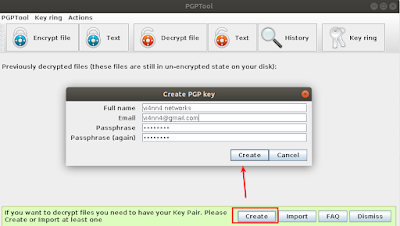
1) define the root password, by the option above >> Create << and set file and personal of information how: name, email and password in my case was create the password xuxa@123
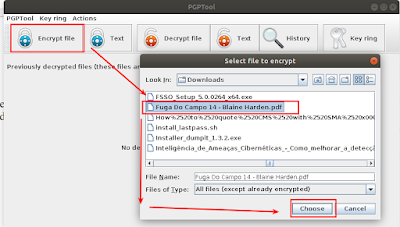
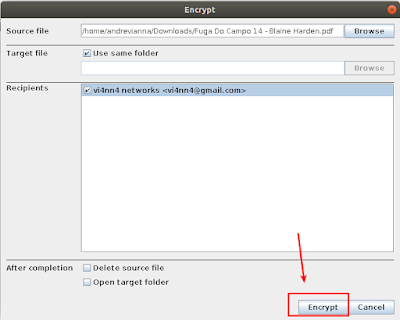
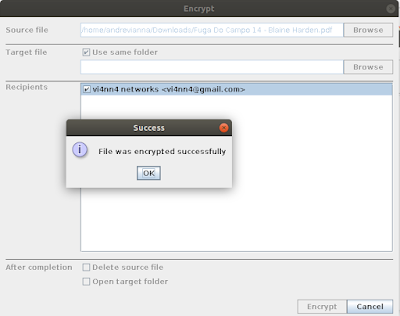
2) set encryption file
3) for decrypt file follow, decrypt file and set choose an than set the password
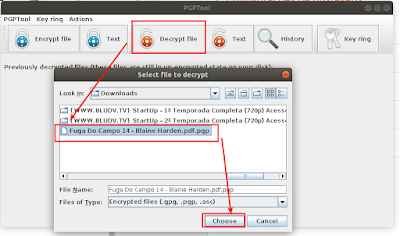
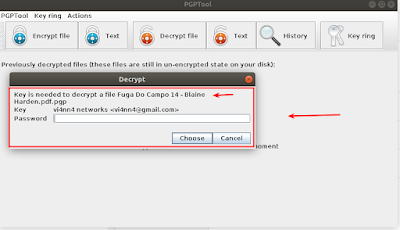
for ubuntu: https://github.com/pgptool/pgptool/releases/download/0.5.1.0/pgptoolgui-0.5.1.0.zip
unzip file downloaded and access this folder: pgptoolgui-0.5.1.0.zip
after that execute this command:
java -jar pgptoolgui-0.5.1.0.jar
now in this case execute follow the steps:
1) define the root password, by the option above >> Create << and set file and personal of information how: name, email and password in my case was create the password xuxa@123

2) set encryption file


3) for decrypt file follow, decrypt file and set choose an than set the password


HOW TO DECRYPT FILE BY OPENSSL USING PRIVATE KEY FOR UBUNTU
first install openssl, after that execute this command:
string command:
openssl rsautl -decrypt -inkey ChavePrivada.key -in Criptograma -out Criptograma.decrpt
description string commands:
openssl rsautl <<< for start the decrypt file
-decrypt << for decrypt file request
-inkey << for set private key
-in << for set cripto file
-out << for registry output file decrypt

for check the valid cert before just execute:
openssl rsa -in ChavePrivada.key -check

string command:
openssl rsautl -decrypt -inkey ChavePrivada.key -in Criptograma -out Criptograma.decrpt
description string commands:
openssl rsautl <<< for start the decrypt file
-decrypt << for decrypt file request
-inkey << for set private key
-in << for set cripto file
-out << for registry output file decrypt

for check the valid cert before just execute:
openssl rsa -in ChavePrivada.key -check

sexta-feira, 23 de novembro de 2018
AD CLI FOR DELETE INACTIVE COMPUTERS
dsquery computer -inactive 60
dsquery computer -inactive 60 -limit 0| dsrm -noprompt
dsquery computer -inactive 60 -limit 0| dsrm -noprompt
Assinar:
Postagens (Atom)